
StudySphere
Role-aware study tracking with OTP-verified onboarding and weak-area detection computed in the database
Visit live project- Backend runtime
- ASP.NET 8
- Core tables
- 9
- Backend layers
- 5
- User roles
- 2
Overview
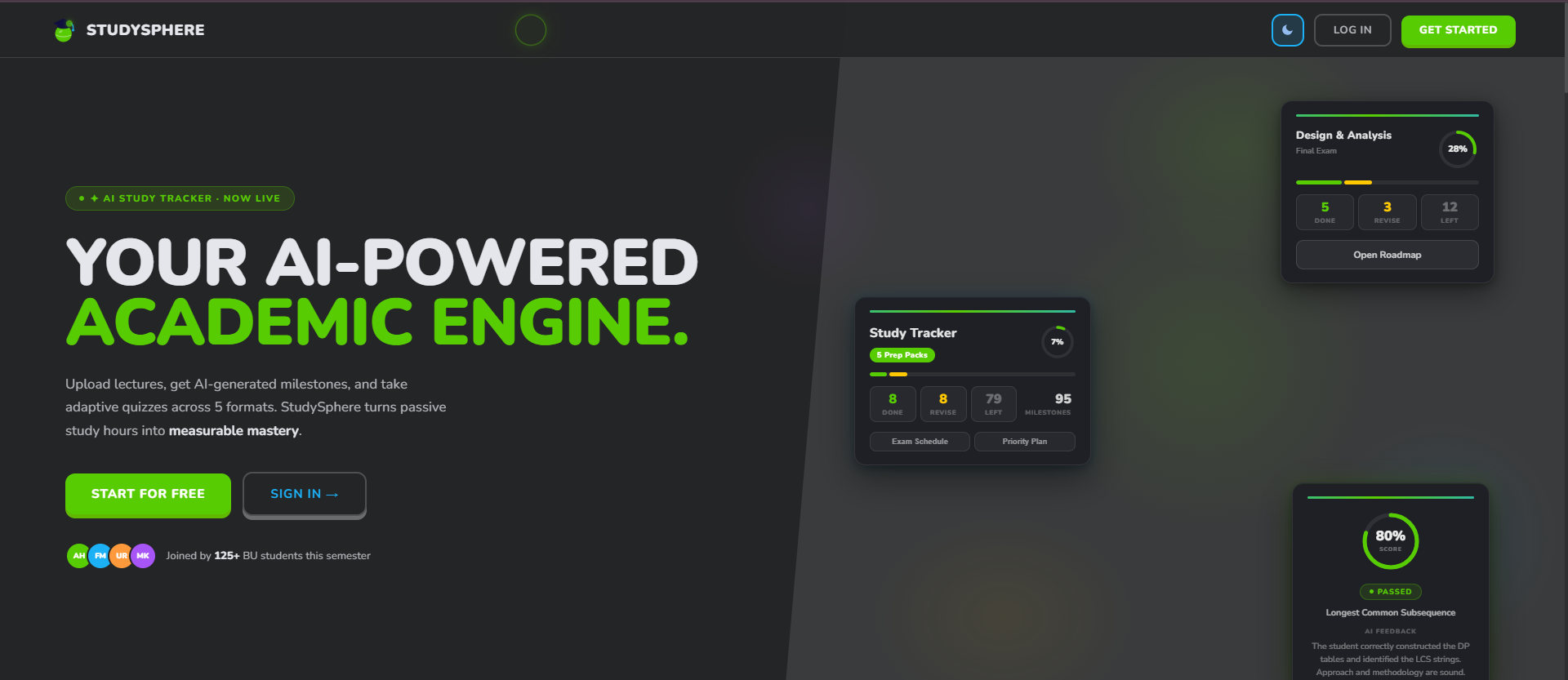
StudySphere is a full-stack learning platform built on a React 18 client and an ASP.NET Core 8 Web API, with Entity Framework Core 8 over PostgreSQL. It serves two distinct audiences from one dataset — students logging sessions, setting goals and receiving guidance, and administrators managing recommendations and cohort analytics. The defining engineering decision was to push weak-area detection down into the database itself, so the analytics that drive the product cannot drift away from the data that produces them.
Two surfaces, one system
Student workspace
/dashboard
Study session logging, goal management, performance trends, notifications and personalised recommendations — the day-to-day surface.
React 18, Vite 5, React Router v6, Recharts
Admin console
/admin
Recommendation authoring, cohort analytics, student performance views and platform guidance controls, gated behind a separate credential path.
React 18, role-gated routing, JWT-scoped API access
The challenge
Students know they are struggling. They rarely know where.
Most study apps are timers with a to-do list attached. Logging hours is not insight — a student who spends four hours on the subject they already enjoy and twenty minutes on the one they are failing has a full log and a false picture. StudySphere was scoped to close that gap: turn raw session data into a ranked view of weak subjects without asking the student to self-diagnose, and give administrators a lever to push structured guidance back out.
That meant a system with two audiences reading the same dataset from opposite directions, and an analytics layer trustworthy enough to base recommendations on.
- Self-reported weak areas are unreliable — students over-index on whatever they most recently failed
- Analytics computed in application code drift the moment a second client touches the same tables
- Two audiences, one dataset — students need their own history, admins need the cohort view
- Email-based signup has to verify the address before an account exists, not after
What we built
A layered ASP.NET Core backend with the analytics pushed down into PostgreSQL
The backend follows a strict five-layer separation — controllers handle HTTP, services hold business logic, repositories own data access, a facade coordinates the multi-step study-planner workflows, and an EF Core DbContext sits underneath. That structure exists so no single class ends up knowing about both an HTTP request and a SQL query.
The analytics deliberately break out of that stack. Weak-area detection runs as a PostgreSQL trigger on study_log insert, and the ranked weak-subject queries are served by stored procedures. The rule is defined once, in the database, so it holds no matter which client writes the row — the React app today, a reporting job or a mobile client later.
On the frontend, a single Axios service instance carries every call. It injects the bearer token, and a 401 anywhere in the app forces a clean redirect rather than leaving the user on a half-authenticated screen.
What we delivered
Three-step OTP onboarding
Signup is a wizard, not a form: identity and enrolment details, then email OTP verification, then password creation. The account row is written only after the code is verified — OTP state lives in its own table with expiry and attempt limits, so an abandoned signup leaves nothing behind and does not burn the email address.
Role-aware authentication
Students and administrators enter through separate paths, and the chosen role is validated server-side against the account’s actual role. A mismatch fails loudly instead of quietly issuing a lower-privilege session. JWTs are issued per role and validated on every protected route.
Study session logging
Sessions capture subject, duration and performance. Each insert feeds both the student’s own history and the trigger that maintains their weak-area profile — one write, two purposes, no background job to fall behind.
Weak-area detection in the database
The weak_area table is auto-populated by a PostgreSQL trigger on study_log insert, and stored procedures serve the ranked weak-subject queries. The detection logic is schema, not application code, so it cannot be bypassed or reimplemented inconsistently.
Goals and notifications
Students set study goals and receive notifications tied to their progress and detected weak areas, so guidance arrives in the app rather than waiting to be looked up.
Admin-managed recommendations
Administrators author and publish the guidance students receive, which keeps the recommendation layer editorial rather than purely algorithmic — a human decides what advice is worth giving.
Analytics dashboards
Recharts-driven trend views on the student side; overview, students, analytics, performance, recommendations and reporting tabs on the admin side, all reading the same Postgres schema through role-scoped API access.
Documented for handover
The repository carries an architecture guide, an authentication guide, a setup guide and implementation status reports — enough for an engineer who did not build it to stand it up and extend it.
Engineering challenges
The problems that took real work to solve. Tap any one to read how.
Problem
Computing weak areas in C# means every future consumer — a mobile client, a nightly report, an admin tool — has to reimplement the same rules, and any divergence produces two versions of the truth about the same student.
Solution
The rule moved into PostgreSQL: a trigger on study_log maintains the weak-area profile, and stored procedures serve the ranked queries. One definition, enforced at the point of write, regardless of which client caused it.
Security posture
Password storage
BCrypt.Net-Core — per-user salt and an adaptive work factor, not a fast general-purpose hash
Email ownership
OTP verification required before an account is created; codes carry expiry and attempt limits
Session handling
JWT bearer tokens issued per role and validated by JwtBearer middleware on every protected route
Role separation
Student and admin credentials validated against the intended login path; mismatches rejected rather than downgraded
Secret handling
Connection strings, JWT signing key and SMTP credentials loaded from the environment via DotNetEnv — never committed to source
Data integrity
Primary key, foreign key, unique and check constraints enforced in the schema, not only in application validation
Results
5-layer
Backend Architecture
Controllers, services, repositories, facade and EF Core DbContext
DB-level
Weak-Area Detection
PostgreSQL trigger and stored procedures, not application code
OTP + JWT
Authentication
Verified email, BCrypt hashing, role-scoped bearer tokens
38 / 30 / 27
JS / C# / CSS Split
Real engineering weight on both sides of the stack
Outcomes
- A genuinely balanced full-stack codebase — 38% JavaScript, 30% C#, 27% CSS — rather than a thin client over a thick backend or the reverse.
- Weak-area analytics that live in the database and therefore hold for every current and future client of the same schema.
- An onboarding flow closer to a commercial product than a coursework login: verified email, expiring OTPs, attempt limits and adaptive password hashing.
- A five-layer backend with a facade coordinating multi-step workflows, demonstrating the separation most projects this size skip.
- A documentation set — architecture, authentication, setup and status — that makes the system maintainable by someone other than its author.
- A clear roadmap for the remaining admin analytics and reporting views, with the schema and API surface already in place to support them.
Related work
Want something like StudySphere?
Share your goals and we will come back with a clear plan and estimate.